A free plan is only useful if it fits your week. Some free plans cap you by channel, some by posts a month, and some by posts per account. A few leave out a network you need, like X or LinkedIn. So we lined up the free plans by the 2 numbers that matter most: how many channels you can connect and how many posts you can schedule.
| Tool | Channels | Posts | Users and other limits |
|---|---|---|---|
| Capybaroar | 3 channels | 30 scheduled posts a month | 1 member, free forever |
| Buffer | Up to 3 channels | 10 scheduled posts per channel | 1 user |
| Publer | 3 social accounts (no X) | 10 scheduled posts per account | 1 user |
| Metricool | 1 brand, no LinkedIn or X | 20 posts a month | 30 days of analytics |
| Zoho Social | 1 brand (6 channels) | Not listed | 1 team member, 5 AI credits |
| Pallyy | 1 social set | 15 scheduled posts a month | Image posts only |
| Planable | Not listed | Your first 50 posts, no time limit | Not listed |
| Typefully | 1 social set | 10 posts a month | 1 user |
| Tailwind | Pinterest only | Not listed | Free to start with no card |
All limits come from each tool's own pricing page in November 2026. "Not listed" means the page doesn't say. Free plans change often, so check before you build your routine around one.
Our picks
- Best overall
 Capybaroar30 scheduled posts a month on 3 channels, plus an inbox, analytics and an API.
- Best for many networks
 Zoho Social6 channels for one brand, WhatsApp and Snapchat included, on a plan that stays free after the trial.
- Most posts to start
 PlanableYour first 50 posts are free, with no time limit.
All 9 compared
| Tool | Price from | Free plan | Free trial | Best for |
|---|---|---|---|---|
| 1. Capybaroar | $29/mo | 3 channels | 14 days | teams that want an AI agent to run social |
 2. Buffer | $5/mo per channel | 3 channels | 14 days | solo creators and small teams |
 3. Publer | $5/mo | 3 accounts | 7 to 14 days | creators on a tight budget |
 4. Metricool | $20/mo | 1 brand | – | social media managers who live in analytics |
| 5. Zoho Social | US$10/mo | 1 brand | 15 days | businesses already on Zoho |
 6. Pallyy | $25/mo | 1 social set | – | agencies that bill per client |
| 7. Planable | $33/mo per workspace | 50 posts | – | teams that review posts together |
 8. Typefully | Free to start | 10 posts/mo | – | writers who post on X and LinkedIn |
 9. Tailwind | $11.99/mo | Yes | – | growing Pinterest traffic |
The cheapest paid plan on each tool's own pricing page
| Price from | |
|---|---|
| Buffer | $5/mo per channel |
| Publer | $5/mo |
| Zoho Social | US$10/mo |
| Tailwind | $11.99/mo |
| Metricool | $20/mo |
| Pallyy | $25/mo |
| Capybaroar | $29/mo |
| Planable | $33/mo per workspace |
Prices as listed in November 2026. Some are per user, per channel or per workspace, and some are billed yearly, so read each tool below before you compare.
| Tool | Free plan | Free trial | AI | Inbox | Approvals | MCP |
|---|---|---|---|---|---|---|
| Capybaroar | ||||||
| Buffer | ||||||
| Publer | – | |||||
| Metricool | – | |||||
| Zoho Social | ||||||
| Pallyy | ||||||
| Planable | – | |||||
| Typefully | – | – | – | |||
| Tailwind | – | – | – |
A dash means we couldn't find it on the tool's homepage or pricing page in November 2026. It may still exist on a higher plan or a help page.
1Capybaroar
Best for teams that want an AI agent to run social
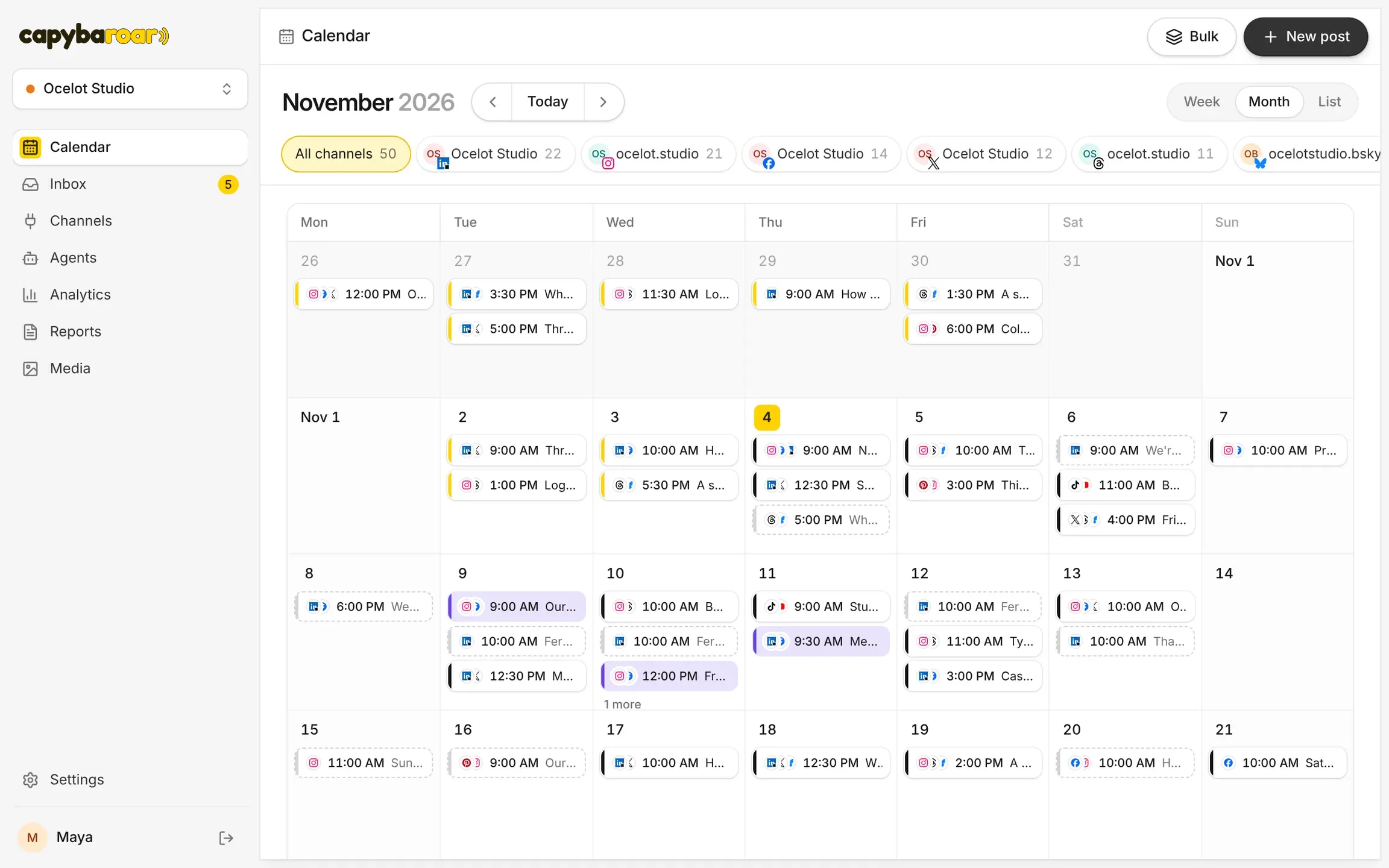
Capybaroar is an agentic social media platform: an AI agent plans and writes your posts, and you schedule them to 14 networks from one calendar.
Capybaroar's Free plan gives you 3 channels and 30 scheduled posts a month, for 1 member and 1 brand, with no end date. Capybaroar works with 14 networks, including Instagram, TikTok, LinkedIn, YouTube, Bluesky and Discord.
The free plan holds more than a calendar. It includes one inbox for comments and mentions, analytics with best times to post, a link in bio page, and the MCP server and REST API, so you can schedule from Claude, ChatGPT or Cursor. AI writing and the agent need a paid plan. When you outgrow Free, Creator is $29 a month for 8 channels and unlimited posts.
What's included
- AI: An AI agent plans and writes posts as drafts; AI writing, images and video from credits on paid plans.
- Inbox: One inbox for comments and mentions on every plan, with suggested replies on paid plans.
- Approvals: Approvals on Pro and Agency; clients who only approve take no seat.
- Analytics: Reach, engagement, followers and best times to post on every plan.
- Reports: Reports by link, PDF or email on Pro and Agency, with your logo on Agency.
- MCP: MCP server and REST API on every plan, Free included.
What we like
- An agent plans and writes a week of posts from one message, then saves them for your review
- MCP server and REST API on every plan, Free included, so you can post from Claude, ChatGPT or Cursor
- One inbox, analytics and link in bio come with every plan
What to know
- Newer than the big names, with fewer integrations so far
- AI features need a paid plan; Free covers scheduling only
2Buffer
Best for solo creators and small teams
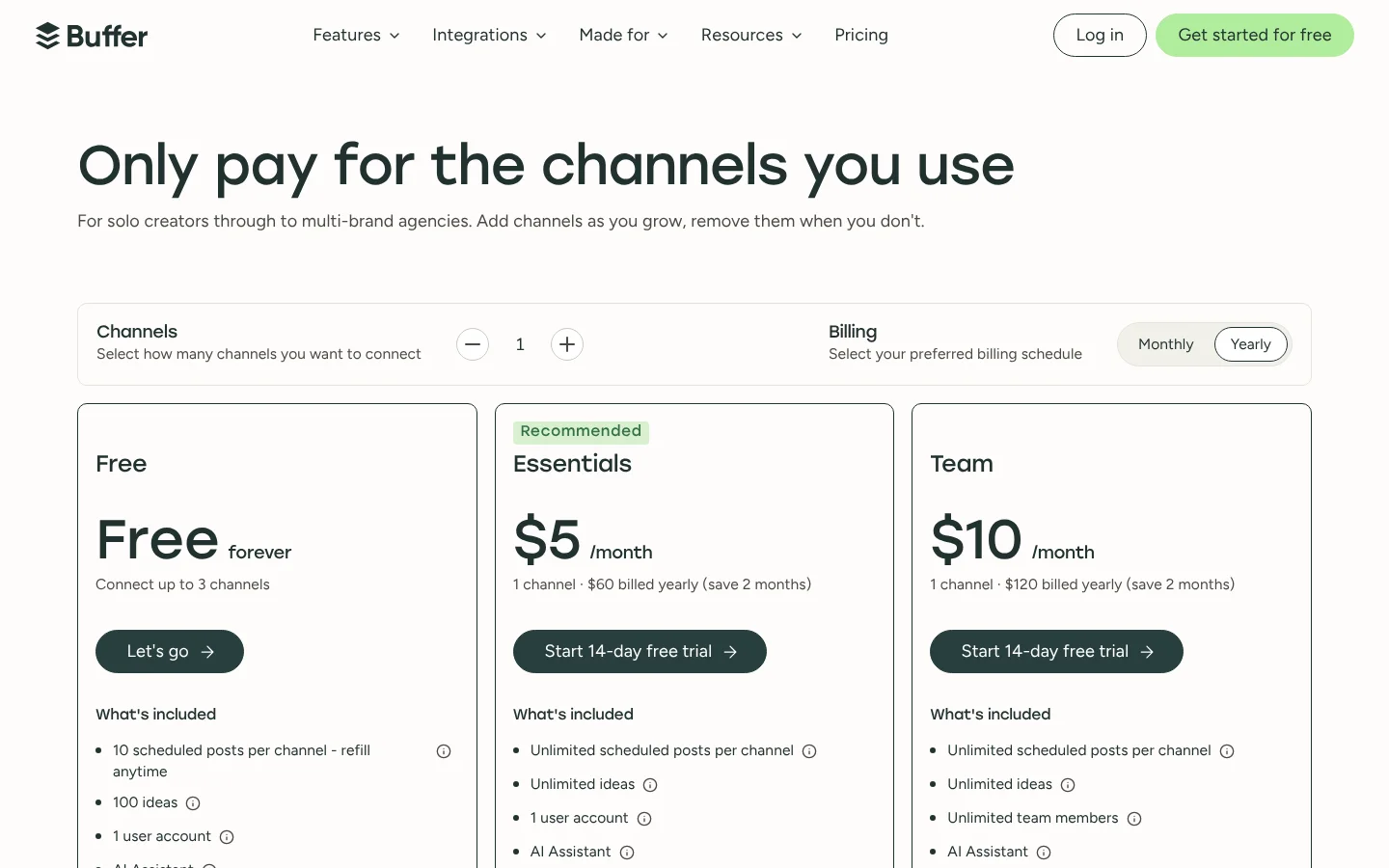
Buffer is a social media scheduler that charges per channel, with a free plan for up to 3 channels.
Buffer's free plan covers up to 3 channels with 10 scheduled posts per channel, for 1 user. That is up to 30 posts in the queue at once, and you can refill it as posts go out. It works with a long list of networks, including Threads, Bluesky, Mastodon and Substack.
Free users get the community inbox for replying to comments and 30 days of insights. When you need more, you pay per channel: $5 a month per channel on Essentials, billed yearly. That makes Buffer an easy step up if you only add one or two channels.
What's included
- AI: AI Assistant on all plans to write and repurpose posts, plus AI reply suggestions and AI takeaways on results.
- Inbox: Community inbox to reply to comments on all plans.
- Approvals: Approval workflows on the Team plan only.
- Analytics: Insights on all plans (30-day history on Free), more analytics on paid plans.
- Reports: Export reports as CSV, PDF or markdown on paid plans; branded reports on Team only.
- MCP: Connect Buffer to Claude or ChatGPT and manage your whole workflow from a conversation.
- Mobile app: iOS and Android apps.
What we like
- Free plan for up to 3 channels
- Pay only for the channels you use
- Unlimited team members on the Team plan
What to know
- Price grows with every channel you add
- Approvals and branded reports only on the Team plan
3Publer
Best for creators on a tight budget
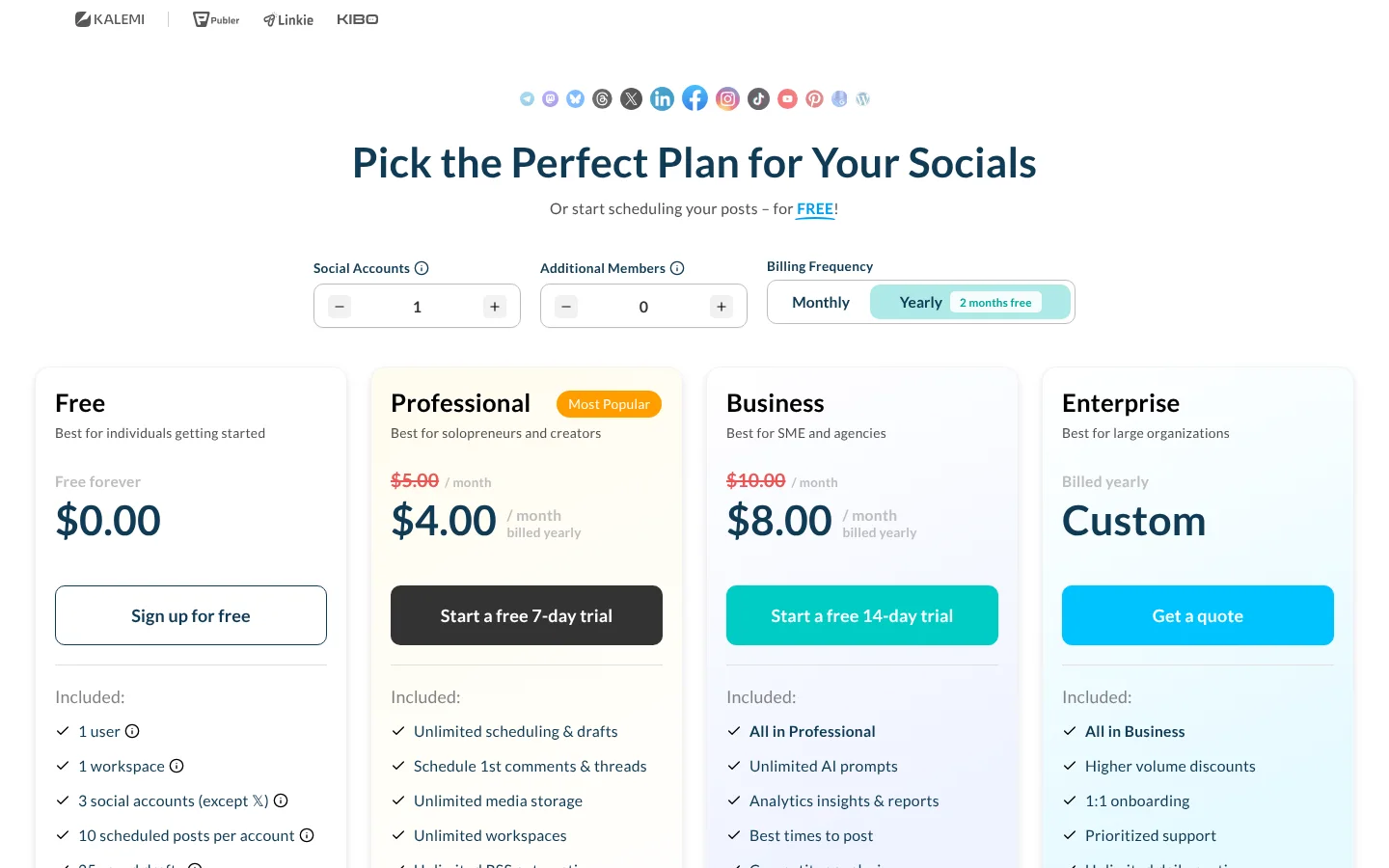
Publer is a low-cost social media scheduling tool with a free forever plan.
Publer's free plan lets 1 user connect 3 social accounts and schedule 10 posts per account. You also get 25 saved drafts. The catch is X: the free plan can't connect X accounts, and post history only goes back 24 hours.
Publer supports more networks than most tools here, including Telegram, WordPress and Google Business Profile. If you upgrade, Professional starts at $5 a month, or $4 a month billed yearly, with the final price based on how many accounts and members you pick. Analytics and unlimited AI need Business, from $10 a month.
What's included
- AI: AI Assist writes posts, makes images and helps reply to comments; unlimited AI prompts on Business.
- Approvals: Approval workflows for your team and outside clients.
- Analytics: Analytics insights, best times to post and competitor analysis on Business.
- Reports: Analytics insights and reports on Business.
- MCP: Publer MCP: Connect AI assistants to Publer to create & schedule content, manage your posts, and access analytics insights through MCP.
- Mobile app: Mobile app to schedule posts from your phone.
What we like
- Free forever plan
- Low starting price with a cheaper yearly option
- Supports many networks, including Telegram, Bluesky and WordPress
What to know
- Free plan cannot connect X accounts
- Analytics, unlimited AI and MCP need the Business plan
4Metricool
Best for social media managers who live in analytics
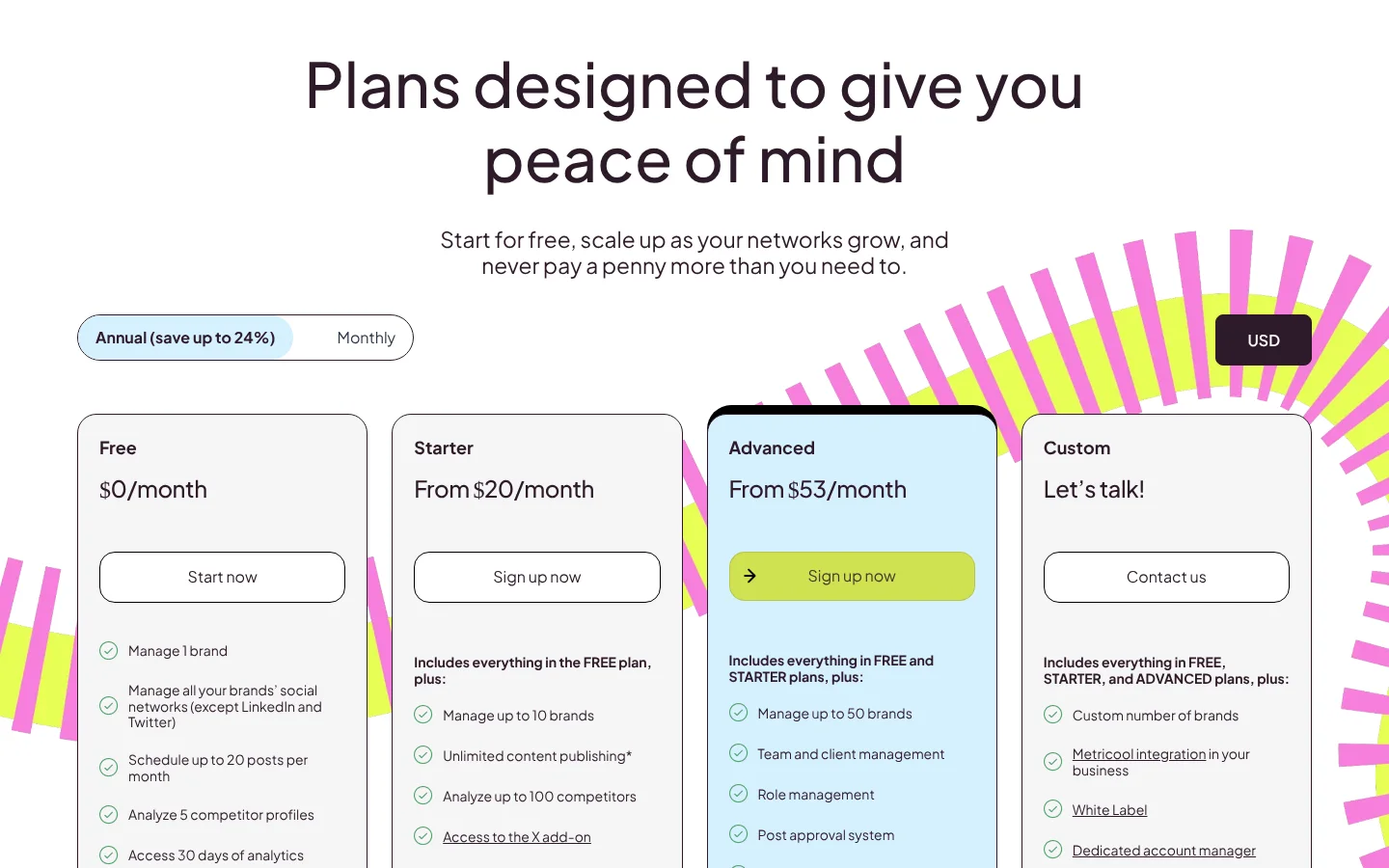
Metricool is a social media management tool with deep analytics, priced per brand.
Metricool's free plan covers 1 brand and lets you schedule up to 20 posts a month, with 30 days of analytics. Metricool doesn't charge per network, so one brand can hold several channels. Two are missing on Free, though: LinkedIn and X.
Metricool is strongest on numbers, so the free plan is a good way to see its reports before you pay. Paid plans keep your full history. Starter is from $20 a month billed yearly for up to 5 brands, or $25 billed monthly. X needs a $10 a month add-on per account even on paid plans.
What's included
- AI: AI social media assistant with 5 to 35 credits per brand a month; AI alt text.
- Inbox: Inbox for messages and comments; X needs an add-on.
- Approvals: Post approval system on Advanced.
- Analytics: 30 days on Free, unlimited history on paid plans; competitor analysis.
- Reports: PDF and PPT reports from Starter; custom report templates on Advanced.
- MCP: Metricool MCP.
- Mobile app: Apps on Google Play and the Apple Store.
What we like
- Free plan for 1 brand
- Priced by brand, not per network or user
- Built-in MCP plus Claude and ChatGPT connectors
What to know
- X needs a $10/month add-on per account
- Approvals and API only on Advanced
5Zoho Social
Best for businesses already on Zoho
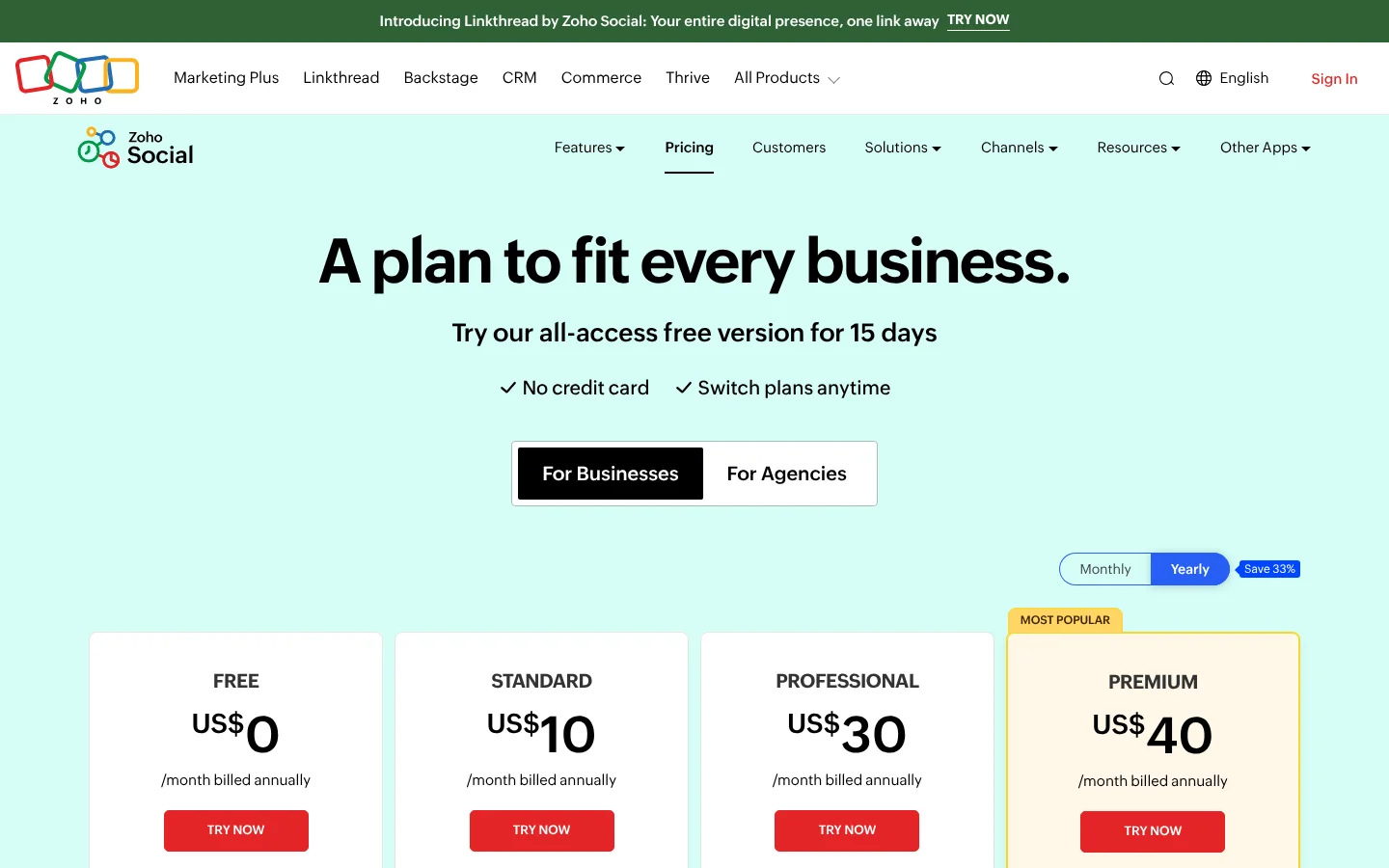
Zoho Social is the social media management tool in the Zoho suite, with a forever free plan.
Zoho Social starts you on a 15-day free trial with no card. After that, your account moves to a forever free plan with 1 brand, 6 channels, 1 team member and 5 AI credits. Zoho's page doesn't list a post limit for the free plan, and it calls the free features limited.
Zoho covers networks that most tools here skip, like WhatsApp and Snapchat, and it can turn comments into CRM leads. If you need more, Standard is US$10 a month billed yearly for 14 channels. The inbox and approvals sit on Premium at US$40 a month.
What's included
- AI: AI picks best times to post, spots engagement spikes and turns comments into CRM leads; Zia AI assistant; AI credits on every plan.
- Inbox: Inbox on the Premium plan.
- Approvals: Content approvals and workflow on the Premium plan.
- Analytics: Audience and engagement analytics with pre-built or custom reports; post insights from Professional.
- Reports: Summary reports on Standard; custom and shared reports on Premium.
- MCP: Zoho Social MCP is listed under Developer Tools.
- Mobile app: Apps for Android and iOS.
What we like
- Forever free plan after the 15-day trial
- Long list of networks, including WhatsApp, Telegram and Bluesky
- Apps for Android and iOS
What to know
- Inbox and approvals only on the top Premium plan
- Only 1 team member below Premium; extra members cost US$10 each per month
6Pallyy
Best for agencies that bill per client
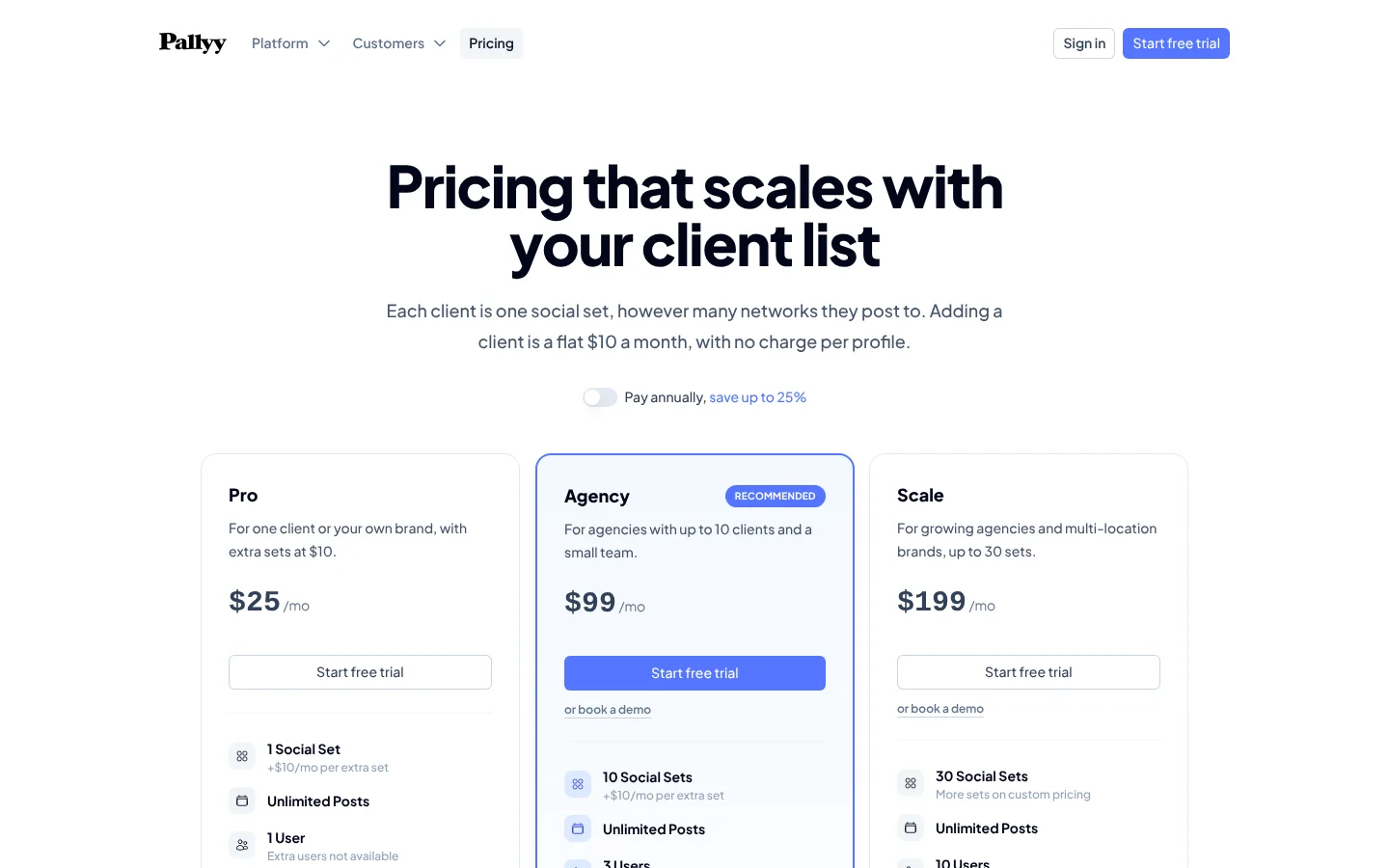
Pallyy is a social media scheduler for agencies, priced per client.
Pallyy's free plan gives you 1 social set and 15 scheduled posts a month, with no card needed. A social set can hold up to 11 accounts, so one brand can post to many networks from it. The big limit is format: the free plan allows image posts only.
That makes it fine for a brand that posts photos and graphics, and a poor fit if you post video. Pro is $25 a month for unlimited posts, the social inbox and AI captions. Pallyy is built for agencies, and each extra client is a flat $10 a month.
What's included
- AI: AI captions on paid plans.
- Inbox: Social inbox on paid plans for DMs, comments and reviews.
- Approvals: Client and team approvals; clients approve from a shared link with no account.
- Analytics: Instagram, Facebook and LinkedIn analytics, kept 5 years on paid plans.
- Reports: Custom per-client reports with PDF export on Agency and Scale.
- MCP: Schedule posts from ChatGPT and Claude.
What we like
- Priced per client, not per channel
- Clients approve posts from a link without an account
- Free plan to start
What to know
- Pro has 1 user and no extra users
- Custom reports only on Agency and Scale
7Planable
Best for teams that review posts together
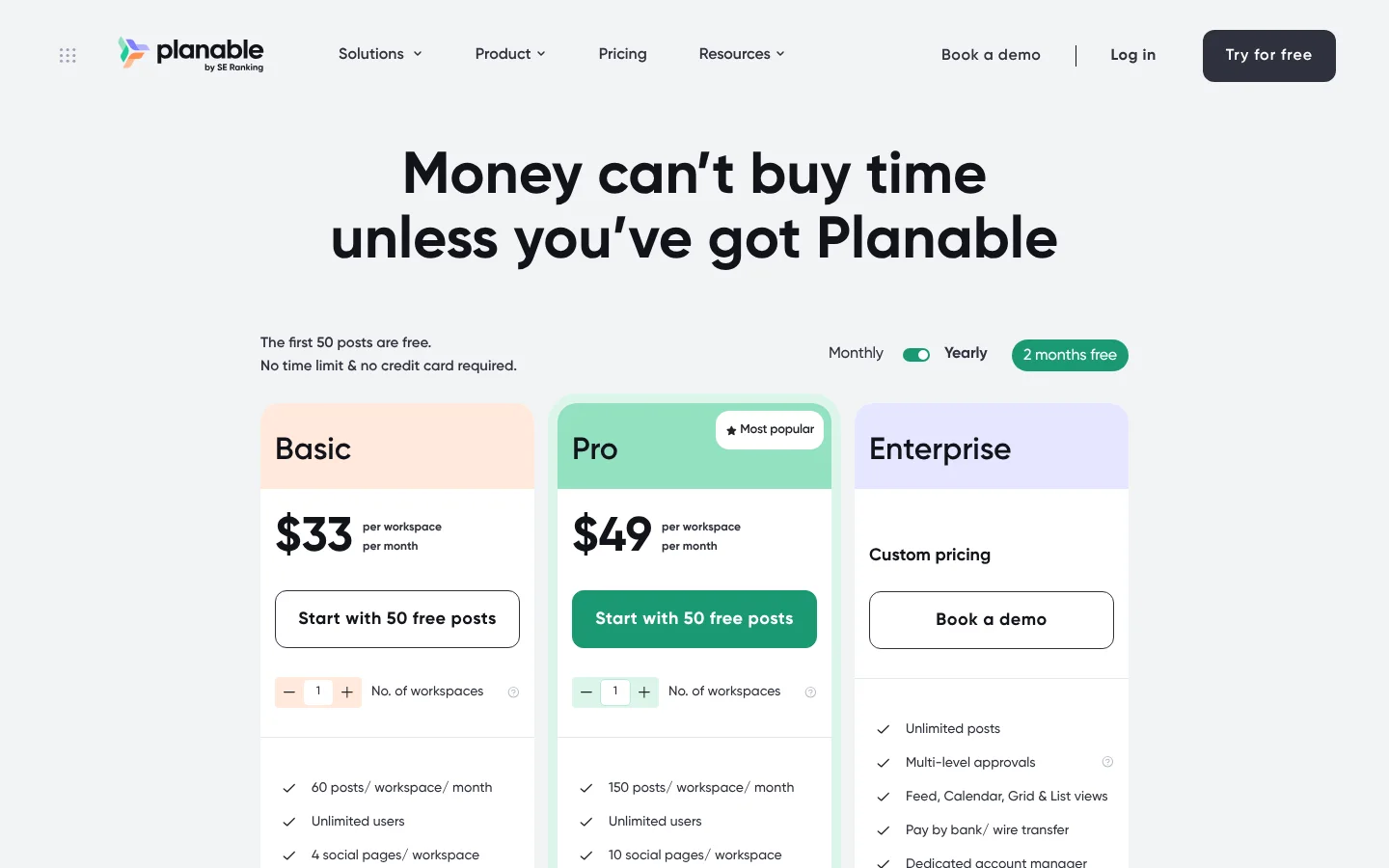
Planable is a collaboration-first social media management tool where teams review and approve posts together.
Planable takes a different route. There is no monthly free plan. Instead, your first 50 posts are free, with no time limit and no credit card. That is a total, so it works best as a long test drive before a team commits.
Planable is built for teams that review posts together, with feedback and approvals right on each post. Paid plans are priced per workspace: Basic is $33 per workspace a month for 60 posts a month and unlimited users. The inbox and analytics cost extra below Enterprise, at $7.5 and $12 per workspace a month.
What's included
- AI: AI post rewrite, AI post generate, and AI replies in the inbox add-on.
- Inbox: Paid add-on for comments and DMs on Basic and Pro; included on Enterprise.
- Approvals: 2 approval types on Basic, 3 on Pro, multi-level on Enterprise.
- Analytics: Paid add-on on Basic and Pro; included on Enterprise.
- Reports: Custom reports for stakeholders, part of the analytics add-on.
- MCP: MCP Connector.
What we like
- Unlimited users on every plan
- Approval workflows with suggestions and annotations
- MCP connector on every plan
What to know
- Priced per workspace, with post caps per workspace
- Inbox, analytics and listening cost extra below Enterprise
8Typefully
Best for writers who post on X and LinkedIn
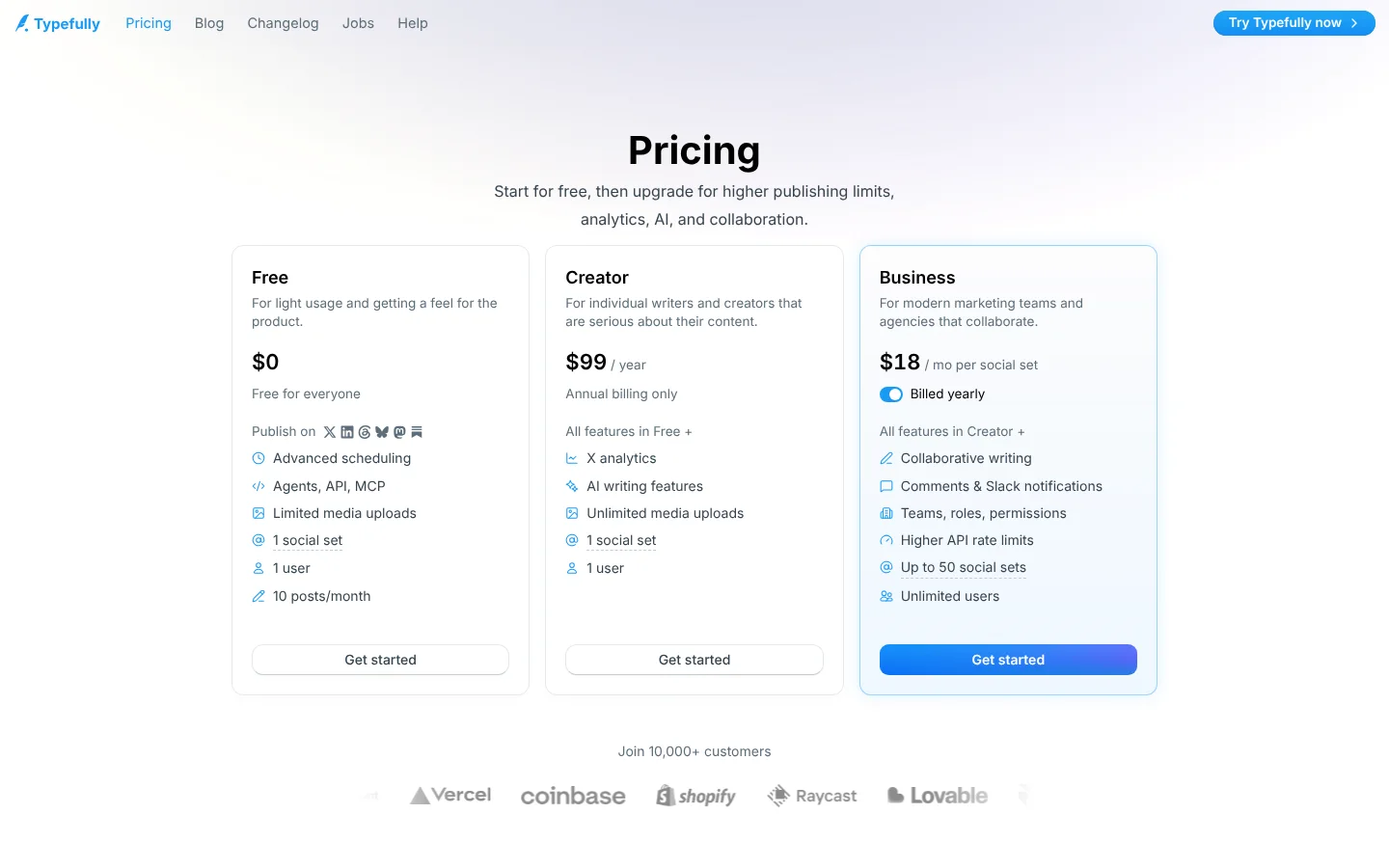
Typefully is a writing and scheduling tool for X, LinkedIn, Threads, Bluesky and Mastodon.
It's a writing tool first. Its free plan gives 1 user 1 social set and 10 posts a month, with limited media uploads. It cross-posts to X, LinkedIn, Bluesky, Threads and Mastodon, so it suits people who mostly post text.
Free also includes advanced scheduling plus agents, the API and MCP, which is rare at $0. AI writing and X analytics need a paid plan. Creator is billed yearly only, and Business is priced per social set. If you post video to Instagram or TikTok, pair it with another tool.
What's included
- AI: AI writing assistant that learns your voice; rewrite and improve; AI image descriptions (paid plans).
- Analytics: X analytics on paid plans: detailed metrics, profile conversion rate, CSV download.
- MCP: Agents, API and MCP on the Free plan; Claude and ChatGPT listed as integrations.
What we like
- Free plan includes scheduling, API and MCP
- Cross-posts to X, LinkedIn, Bluesky, Threads and Mastodon
- Team tools on Business: comments, roles and Slack notifications
What to know
- Creator plan is annual billing only
- Business plan is priced per social set
9Tailwind
Best for growing Pinterest traffic
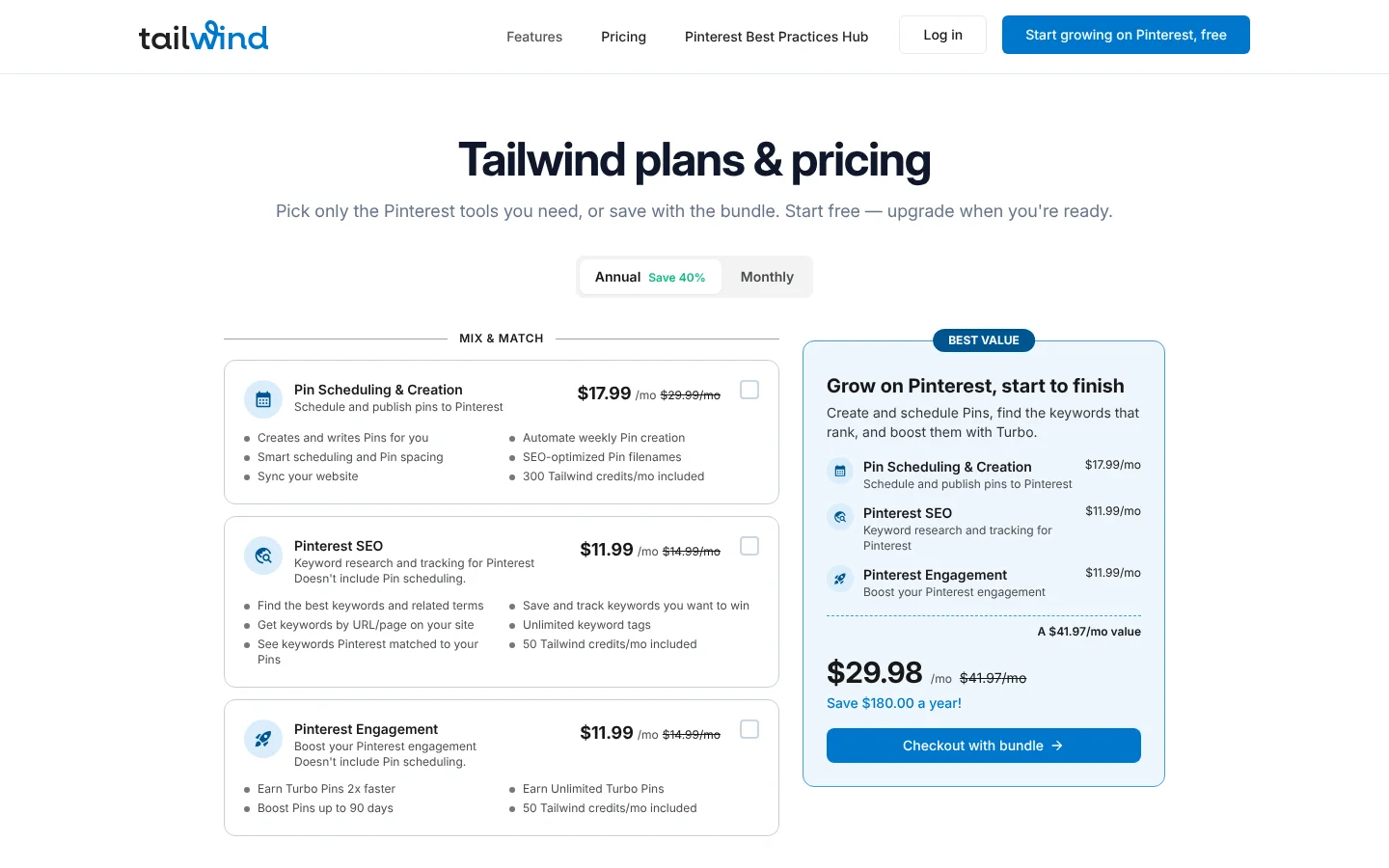
Tailwind is a Pinterest growth tool for keyword research, Pin creation and scheduling.
It's for one network: Pinterest. You can get started free with no credit card, but its pricing page doesn't list what the free start includes, so you will find the limits only after you sign up.
If Pinterest drives your traffic, Tailwind goes deeper than any general tool here. It makes new Pins from your keywords each week and tracks how they rank. Paid plans are per Pinterest account. Pin scheduling starts at $17.99 a month, and Pinterest SEO and engagement are sold apart from scheduling. Tailwind has been a Pinterest developer partner since 2012.
What's included
- AI: Creates and writes Pins for you; SmartPin makes new Pins with titles and descriptions each week.
- Analytics: Pinterest keyword research and rank tracking (Pinterest SEO product).
- MCP: Tailwind MCP is listed under Resources.
What we like
- Pinterest's longest standing developer partner, since 2012
- Makes and schedules new Pins automatically each week
- Buy only the Pinterest tools you need
What to know
- Pinterest only
- Priced per Pinterest account, and scheduling is sold apart from SEO and engagement
How we picked
We only looked at tools you can use for $0 with no end date, like a free plan or Planable's free posts. A short free trial alone didn't count.
- Channels: how many accounts or channels the free plan connects, and which networks it leaves out.
- Posts: the post cap, and whether it counts per month, per channel or in total.
- Upgrade cost: what the first paid step costs, from each tool's own pricing page in November 2026.
- Extras: whether the free plan includes an inbox, analytics or an API.
Capybaroar is our product. We judged its free plan by the same numbers as everyone else's.
The bottom line
For most brands on 3 channels, Capybaroar's 30 posts a month plus an inbox and analytics is the most complete free plan here. Buffer and Publer give you about the same number of posts but count them per channel or account. If you need more channels for one brand, Zoho Social gives you 6 and Pallyy's social set holds up to 11 accounts, though Pallyy caps you at 15 image posts a month. Planable's 50 free posts suit a team that wants to try approvals first.
For a single network, Typefully covers text posts on X and LinkedIn, and Tailwind covers Pinterest. Start with the free plan that fits the networks you use most.