
Posting on LinkedIn every week is easier when you write in batches and let a tool publish for you. The right scheduler depends on who is posting. A founder building a personal brand wants help writing and a clean editor. A team running a company page wants approvals and its other networks in the same place.
We only included tools whose own pages say they post to LinkedIn. For each one, we list the LinkedIn features the vendor names, like first comments, PDF carousels and company pages.
Prices come from each tool's own pricing page in November 2026. Check the vendor's page before you buy, since prices change.
Our picks
- Best overall
 CapybaroarProfiles and company pages, a first comment and an AI agent that drafts the week, from $29 a month.
- Best for LinkedIn growth
 TaplioBuilt only for LinkedIn, with AI writing in your voice and 5M+ viral posts to learn from.
- Best for writers
 TypefullyA focused editor with LinkedIn first comments and PDF carousels, and a free plan.
All 7 compared
| Tool | Price from | Free plan | Free trial | Best for |
|---|---|---|---|---|
| 1. Capybaroar | $29/mo | 3 channels | 14 days | teams that want an AI agent to run social |
| 2. Taplio | $39/mo | – | 7 days | founders growing on LinkedIn |
 3. Buffer | $5/mo per channel | 3 channels | 14 days | solo creators and small teams |
| 4. Typefully | Free to start | 10 posts/mo | – | writers who post on X and LinkedIn |
 5. Metricool | $20/mo | 1 brand | – | social media managers who live in analytics |
 6. Publer | $5/mo | 3 accounts | 7 to 14 days | creators on a tight budget |
 7. SocialPilot | $25.50/mo | – | 14 days | agencies on a budget |
The cheapest paid plan on each tool's own pricing page
| Price from | |
|---|---|
| Buffer | $5/mo per channel |
| Publer | $5/mo |
| Metricool | $20/mo |
| SocialPilot | $25.50/mo |
| Capybaroar | $29/mo |
| Taplio | $39/mo |
Prices as listed in November 2026. Some are per user, per channel or per workspace, and some are billed yearly, so read each tool below before you compare.
| Tool | Free plan | Free trial | AI | Inbox | Approvals | MCP |
|---|---|---|---|---|---|---|
| Capybaroar | ||||||
| Taplio | – | – | – | |||
| Buffer | ||||||
| Typefully | – | – | – | |||
| Metricool | – | |||||
| Publer | – | |||||
| SocialPilot | – |
A dash means we couldn't find it on the tool's homepage or pricing page in November 2026. It may still exist on a higher plan or a help page.
1Capybaroar
Best for founders and teams posting to profiles and company pages
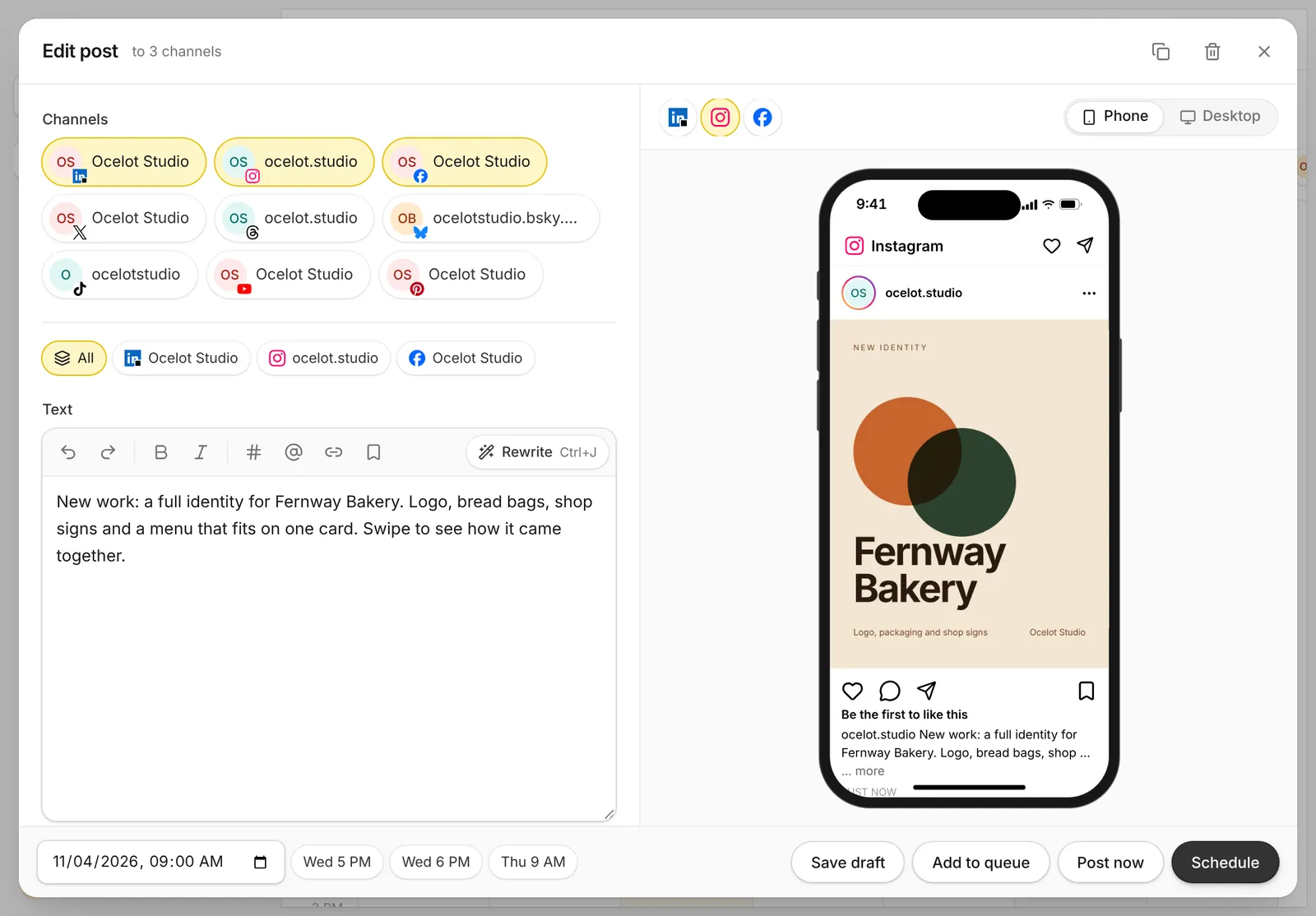
Capybaroar is an agentic social media platform: an AI agent plans and writes your posts, and you schedule them to 14 networks from one calendar.
Capybaroar posts to LinkedIn profiles and company pages, so a founder and their company can share one calendar. You can add a first comment to LinkedIn posts and check a preview before anything goes out. Comments and mentions land in one inbox, and analytics show your best times to post.
On paid plans, the AI agent plans and writes a week of posts from one message, then saves them as drafts for your review. You can also run it from Claude, ChatGPT or Cursor through the MCP server on every plan. Creator is $29 a month for 1 member and 8 channels. Pro is $49 a month for 5 members, with approvals, and the Free plan covers 3 channels and 30 posts a month.
What's included
- AI: An AI agent plans and writes posts as drafts; AI writing, images and video from credits on paid plans.
- Inbox: One inbox for comments and mentions on every plan, with suggested replies on paid plans.
- Approvals: Approvals on Pro and Agency; clients who only approve take no seat.
- Analytics: Reach, engagement, followers and best times to post on every plan.
- Reports: Reports by link, PDF or email on Pro and Agency, with your logo on Agency.
- MCP: MCP server and REST API on every plan, Free included.
What we like
- An agent plans and writes a week of posts from one message, then saves them for your review
- MCP server and REST API on every plan, Free included, so you can post from Claude, ChatGPT or Cursor
- One inbox, analytics and link in bio come with every plan
What to know
- Newer than the big names, with fewer integrations so far
- AI features need a paid plan; Free covers scheduling only
2Taplio
Best for founders growing on LinkedIn
Taplio is an AI tool for growing your brand on LinkedIn.
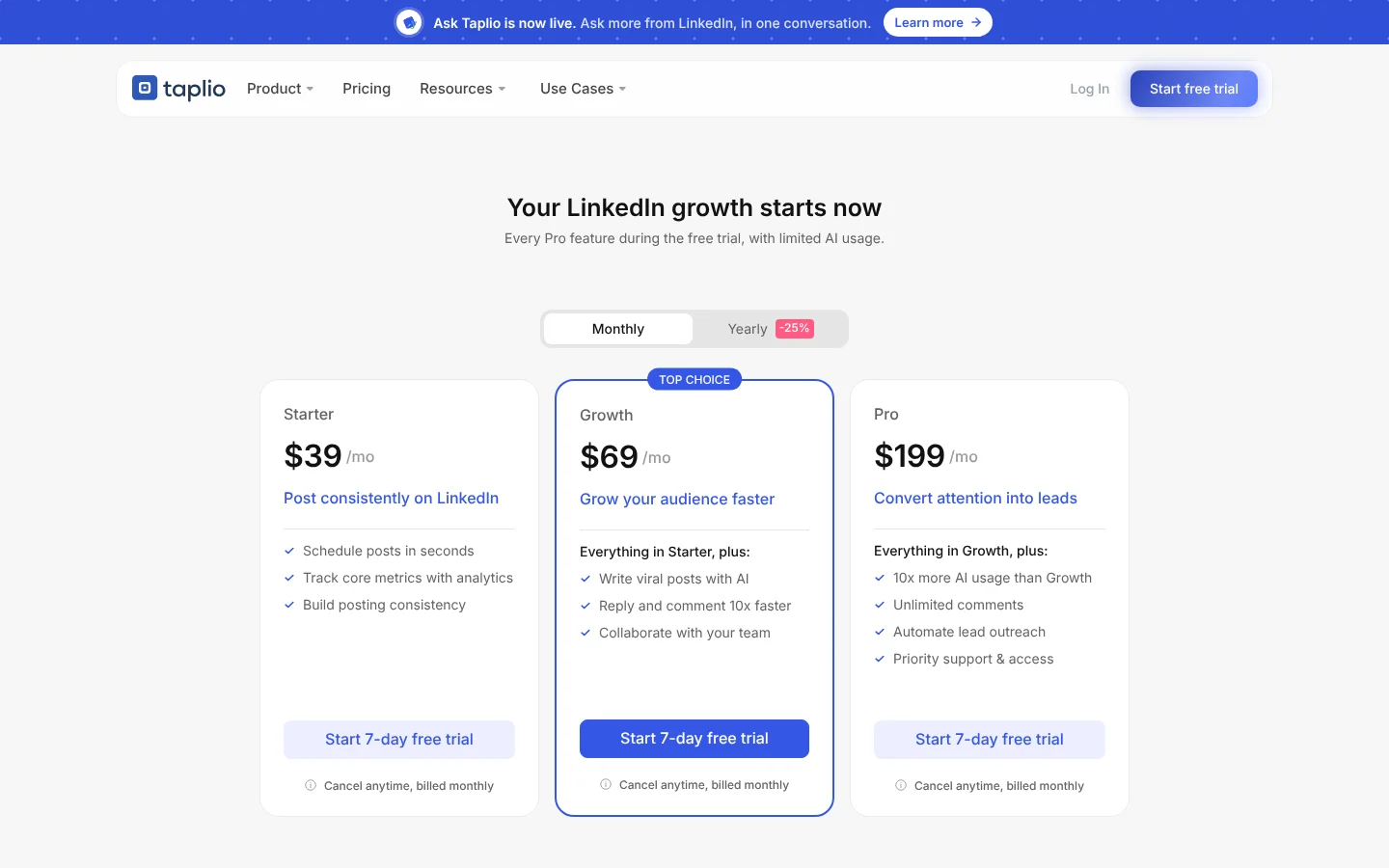
It's built only for LinkedIn. You can search 5M+ viral posts by topic and likes, then draft your own in your voice with its AI. Every plan schedules posts on a monthly or daily calendar. It also posts an automatic first comment and lets you reply to comments on your posts, and it works from Claude as an official connector.
Starter is $39 a month, billed monthly, and covers scheduling and analytics. AI writing and team collaboration start on Growth at $69 a month. Pro at $199 a month adds 10x more AI usage and lead outreach. Yearly billing saves 25%. There's no free plan, but the 7-day trial gives you every Pro feature with limited AI.
What's included
- AI: AI post writing in your voice, Ask Taplio, carousel generator, AI images and AI smart replies.
- Analytics: Advanced post and engagement analytics on every plan.
- MCP: MCP integration and official Claude connector.
What we like
- Built only for LinkedIn, with 5M+ viral posts to search
- MCP and an official Claude connector on every plan
- Auto first comment and comment replies on every plan
What to know
- LinkedIn only
- No free plan, and AI writing starts on Growth at $69/mo
3Buffer
Best for solo creators and small teams
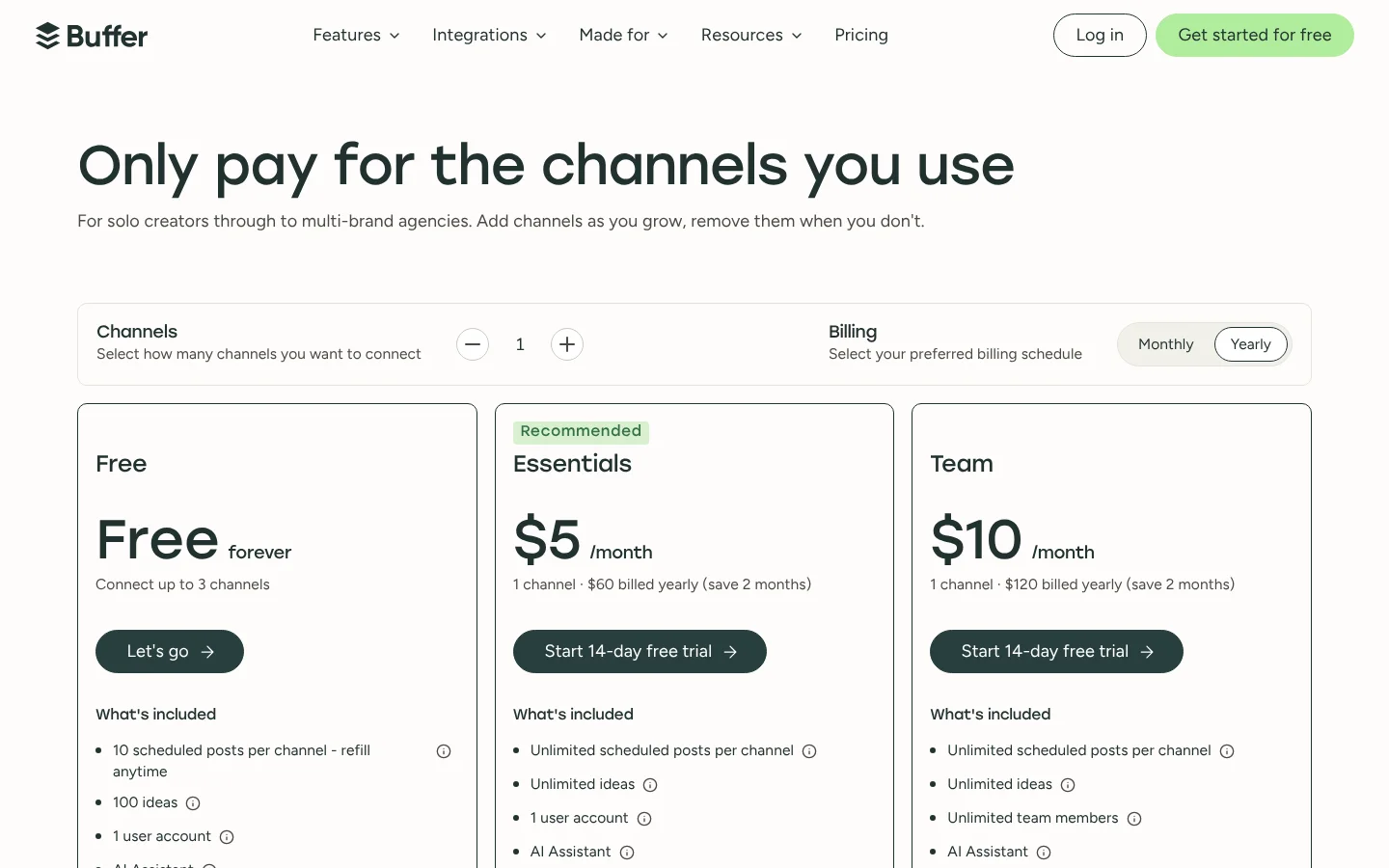
Buffer is a social media scheduler that charges per channel, with a free plan for up to 3 channels.
It's a simple, low-cost way to schedule LinkedIn next to your other channels. Paid plans can add a first comment to LinkedIn posts, and every plan, Free included, lets you reply to LinkedIn comments from the community inbox. You can also connect Buffer to Claude or ChatGPT and manage your posts from a chat.
You pay per channel: $5 a month on Essentials or $10 on Team, both billed yearly. Two channels on Essentials cost $10 a month. The free plan covers 3 channels with 10 scheduled posts each. Approvals need Team, which also gives you unlimited team members.
What's included
- AI: AI Assistant on all plans to write and repurpose posts, plus AI reply suggestions and AI takeaways on results.
- Inbox: Community inbox to reply to comments on all plans.
- Approvals: Approval workflows on the Team plan only.
- Analytics: Insights on all plans (30-day history on Free), more analytics on paid plans.
- Reports: Export reports as CSV, PDF or markdown on paid plans; branded reports on Team only.
- MCP: Connect Buffer to Claude or ChatGPT and manage your whole workflow from a conversation.
- Mobile app: iOS and Android apps.
What we like
- Free plan for up to 3 channels
- Pay only for the channels you use
- Unlimited team members on the Team plan
What to know
- Price grows with every channel you add
- Approvals and branded reports only on the Team plan
4Typefully
Best for writers who post on X and LinkedIn
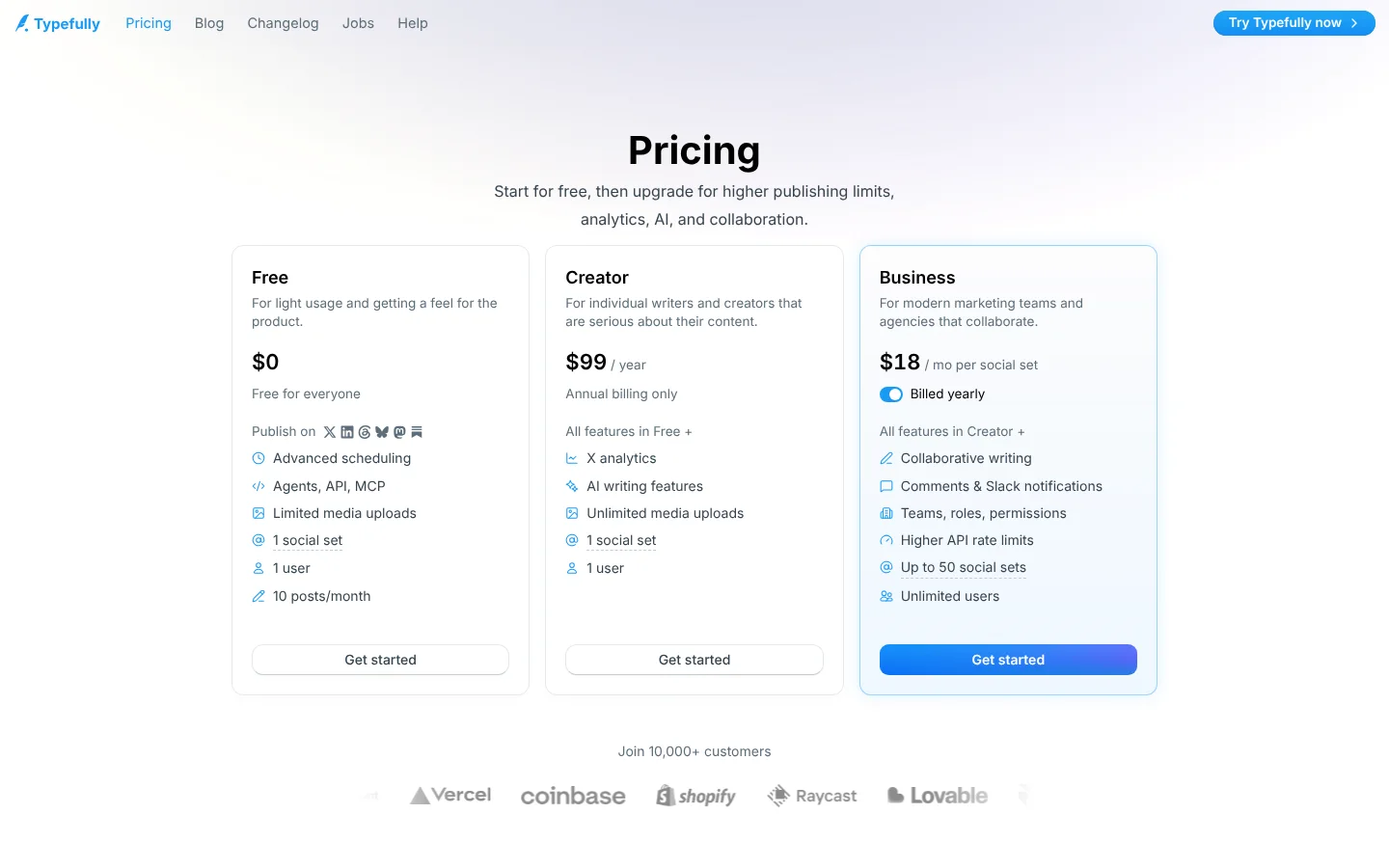
Typefully is a writing and scheduling tool for X, LinkedIn, Threads, Bluesky and Mastodon.
It's a writing app first. Its focused editor helps you turn rough ideas into posts, and its AI learns how you write. For LinkedIn, it lists first comments and PDF carousels, and it can cross-post the same post to X, Bluesky, Threads and Mastodon.
The free plan gives you 1 social set, 1 user and 10 posts a month, with agents, API and MCP included. Creator raises that to 1,000 posts a month and is billed yearly only. Business adds teams, roles and Slack notifications for up to 50 social sets. Its analytics cover X, and the pricing page doesn't list LinkedIn analytics. Paid prices weren't in the page text we captured, so check Typefully's site.
What's included
- AI: AI writing assistant that learns your voice; rewrite and improve; AI image descriptions (paid plans).
- Analytics: X analytics on paid plans: detailed metrics, profile conversion rate, CSV download.
- MCP: Agents, API and MCP on the Free plan; Claude and ChatGPT listed as integrations.
What we like
- Free plan includes scheduling, API and MCP
- Cross-posts to X, LinkedIn, Bluesky, Threads and Mastodon
- Team tools on Business: comments, roles and Slack notifications
What to know
- Creator plan is annual billing only
- Business plan is priced per social set
5Metricool
Best for social media managers who live in analytics
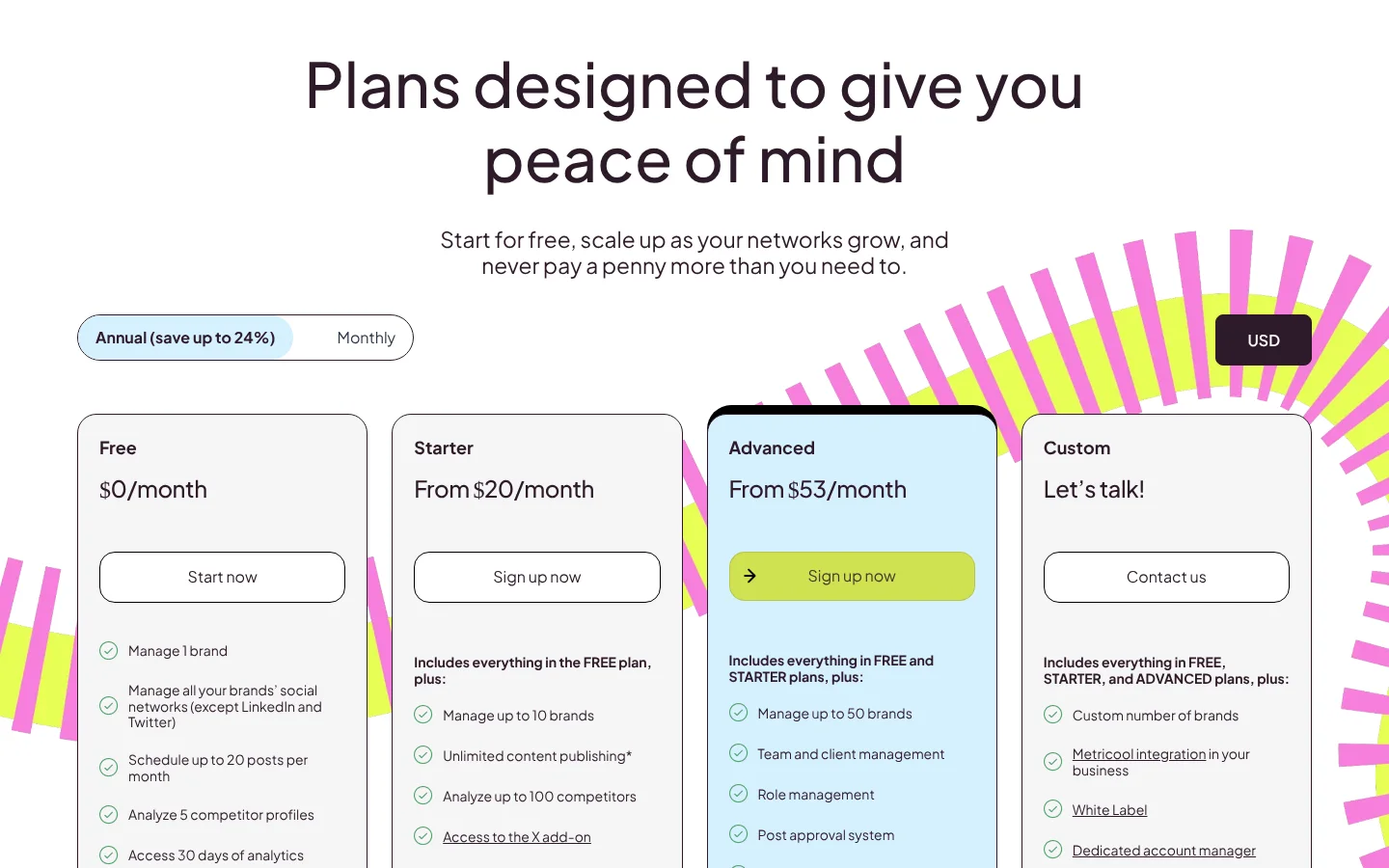
Metricool is a social media management tool with deep analytics, priced per brand.
It's a good pick for teams that want LinkedIn numbers next to every other network. Paid plans keep your full analytics history and compare you with competitors. Reports export as PDF or PPT. It also has a built-in MCP plus Claude and ChatGPT connectors.
LinkedIn needs a paid plan, since the free plan can't connect it. Starter is from $20 a month billed yearly, or $25 billed monthly, for up to 5 brands with unlimited posts. Advanced, from $53 a month billed yearly, adds approvals and team roles for a team that shares the work.
What's included
- AI: AI social media assistant with 5 to 35 credits per brand a month; AI alt text.
- Inbox: Inbox for messages and comments; X needs an add-on.
- Approvals: Post approval system on Advanced.
- Analytics: 30 days on Free, unlimited history on paid plans; competitor analysis.
- Reports: PDF and PPT reports from Starter; custom report templates on Advanced.
- MCP: Metricool MCP.
- Mobile app: Apps on Google Play and the Apple Store.
What we like
- Free plan for 1 brand
- Priced by brand, not per network or user
- Built-in MCP plus Claude and ChatGPT connectors
What to know
- X needs a $10/month add-on per account
- Approvals and API only on Advanced
6Publer
Best for creators on a tight budget
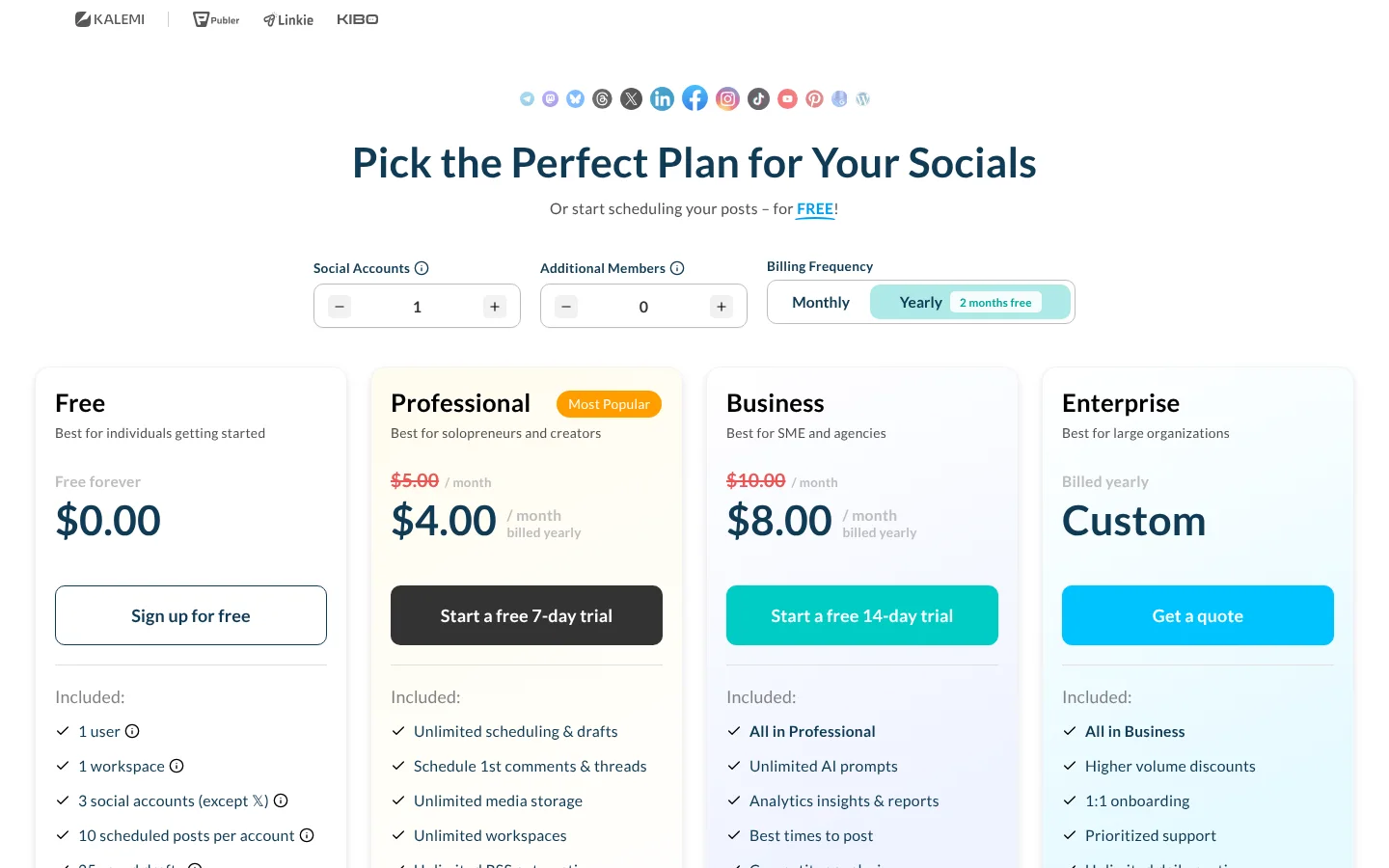
Publer is a low-cost social media scheduling tool with a free forever plan.
Publer works with LinkedIn profiles and pages, and it supports LinkedIn PDF carousels. You can schedule a comment to go out after your post, and the browser extension shares content you find online to LinkedIn in a few clicks. It also posts to 12 other networks, including Bluesky and Mastodon.
Professional starts at $5 a month, or $4 billed yearly, and the price depends on how many accounts and members you pick. Business, from $10 a month or $8 billed yearly, adds analytics, best times to post, unlimited AI and MCP. The free plan covers 3 social accounts with 10 scheduled posts each.
What's included
- AI: AI Assist writes posts, makes images and helps reply to comments; unlimited AI prompts on Business.
- Approvals: Approval workflows for your team and outside clients.
- Analytics: Analytics insights, best times to post and competitor analysis on Business.
- Reports: Analytics insights and reports on Business.
- MCP: Publer MCP: Connect AI assistants to Publer to create & schedule content, manage your posts, and access analytics insights through MCP.
- Mobile app: Mobile app to schedule posts from your phone.
What we like
- Free forever plan
- Low starting price with a cheaper yearly option
- Supports many networks, including Telegram, Bluesky and WordPress
What to know
- Free plan cannot connect X accounts
- Analytics, unlimited AI and MCP need the Business plan
How we picked
We looked at what founders and teams need to post on LinkedIn every week, then checked each tool's own pages.
- LinkedIn support: we only kept tools whose own pages name LinkedIn as a network they post to.
- LinkedIn extras: first comments, PDF carousels and company pages, where the vendor names them.
- Writing help: AI that drafts posts, and the plan where it starts.
- Price: each tool's own pricing page in November 2026, with yearly or monthly billing noted.
Capybaroar is our product. We judged it the same way and list its limits too.
The bottom line
Founders who only care about LinkedIn growth will get the most from Taplio, as long as $39 to $69 a month fits the budget. If you mainly want a good place to write and post to LinkedIn and X together, Typefully's free plan is a fine start. Teams that run a company page next to Instagram, Facebook and other networks should look at Capybaroar, which covers profiles and company pages and adds an AI agent from $29 a month.
On a tight budget, Buffer and Publer post to LinkedIn for a few dollars a month. Try 2 tools on a real week of posts before you pay for a year.



7 SocialPilot
Best for agencies on a budget
SocialPilot is a social media management and scheduling tool for agencies and growing brands.
SocialPilot suits agencies posting LinkedIn content for several clients. It lists LinkedIn document publishing, along with first comments and a content library. You can also adjust each post for the network it goes to. Its AI Pilot writes posts, with 500 AI credits a month on the lowest plan.
Essentials is $25.50 a month, billed yearly, for 7 social accounts and 1 user. Standard at $42.50 a month, billed yearly, adds 3 users, the inbox, analytics and manager approval. Client approvals and white label reports come with Premium at $85 a month, billed yearly. The 14-day trial needs no card.
What's included
What we like
What to know
Visit SocialPilot