Docs / AI agent and MCP
The AI agent
The agent is Claude with every Capybaroar action. Tell it what you need and it plans and writes posts, makes pictures and checks your results.
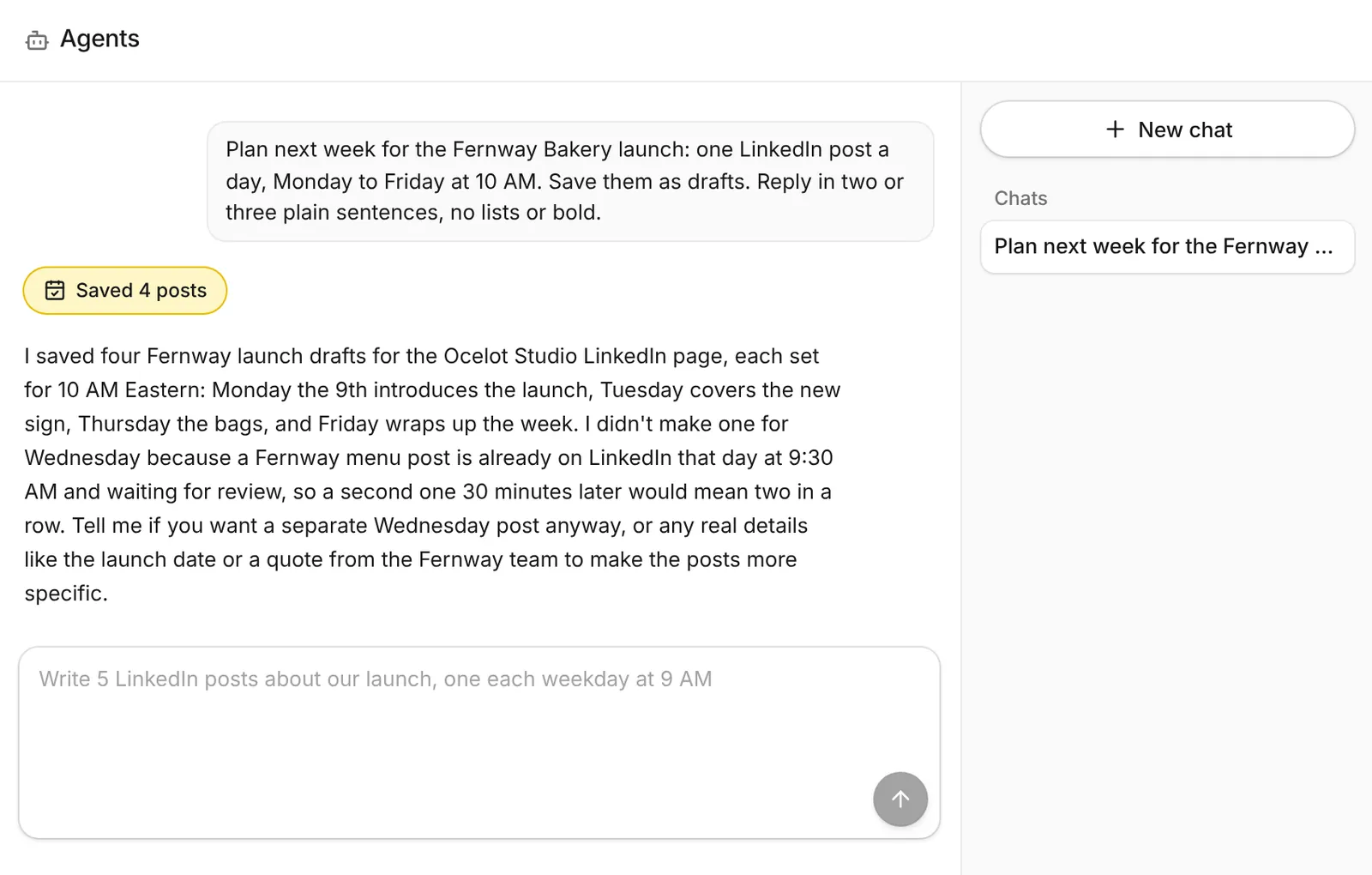
What the agent can do
- Look at your channels and recent posts, then plan and write new ones.
- Save posts as drafts at your queue times, or schedule them when you ask.
- Make pictures and videos for posts and attach them when they're ready.
- Read your analytics and tell you which posts did best.
- Edit or delete posts. It asks before deleting.
It uses the same actions and checks you do, so it can't go past your plan's limits or post to a channel you can't use.
Start a chat
- Open Agents. Click Agents in the sidebar, then New chat.
- Say what you want. For example: "Plan next week for our bakery launch: one LinkedIn post a day, Monday to Friday at 10 AM. Save them as drafts."
- Check the drafts. The agent tells you what it saved. Open them in the calendar to edit, then schedule.
Drafts first
The agent saves drafts unless you ask it to schedule. Nothing goes out until you, or the agent on your request, schedule it.
What it costs
The agent is on paid plans and uses AI credits. Each message costs what it really used, with a small minimum. Pictures and videos it makes are charged on their own.